— 12 MIN
The Financial Advisor Technology Stack: 7 Digital Tools for Independent RIAs
Build a practical financial advisor technology stack across CRM, planning, portfolio data, research, risk analytics, proposals, security, and compliance.
Genesis Risk Monitor publishes this blog and develops one of the products discussed. Comparisons reflect the publisher's perspective. Confirm current features and pricing directly with each provider. Editorial policy
The best financial advisor technology stack is not the one with the most software.
It is the one that allows client information, portfolio data, analysis, decisions, and documents to move through a controlled workflow without constant re-entry.
Independent financial advisors and RIAs often add tools one problem at a time. A CRM is introduced for client records. A planning platform is added later. Portfolio analytics lives somewhere else. Proposals are built in Word or PowerPoint. Data is exported into spreadsheets whenever the systems do not connect.
Each tool may work well on its own while the complete workflow remains fragmented.
This guide organizes the core digital tools for financial advisors into seven categories and explains how to evaluate the stack as a system.
Start With the Advisor Workflow, Not the Software List
Before selecting technology, map the work the firm performs.
A simplified advisory workflow may look like this:
Acquire a prospect → collect information → build or review the plan → import the portfolio → analyze investments → compare alternatives → prepare the proposal → implement → monitor → report and document.
The technology stack should support that sequence.
When tools are selected without a workflow map, firms often create gaps:
- Prospect data is re-entered after onboarding
- Holdings are exported manually
- Portfolio analysis cannot be reused in the proposal
- Model comparisons use different data from client reports
- Notes and approvals are stored in multiple systems
- Final documents cannot be edited or exported cleanly
- Staff depend on one person who understands the workaround
The objective is not perfect integration. It is a clear system of record and a repeatable handoff between each stage.
1. Client Relationship Management
A CRM organizes the relationship rather than the portfolio.
It may contain:
- Prospect and client records
- Contact information
- Household relationships
- Tasks and workflows
- Meeting notes
- Opportunities
- Service calendars
- Communication history
- Assigned team members
The CRM should make it clear who the client is, what stage the relationship has reached, and what action is required next.
Questions to Ask
- Can the system represent households, individuals, businesses, and related accounts?
- Are workflows configurable?
- Can data be exported?
- Does it integrate with the firm’s email, calendar, planning, and document tools?
- Are permissions appropriate for different staff roles?
- Can the firm retain a usable history of client activity?
The CRM is often the operational center of the firm, but it is rarely the best place for detailed portfolio risk analysis.
2. Financial Planning Software
Planning software connects financial goals, cash flows, assumptions, and scenarios.
Depending on the firm’s service model, it may support:
- Retirement planning
- Cash-flow planning
- Goal tracking
- Tax assumptions
- Insurance analysis
- Estate-planning inputs
- Education funding
- Monte Carlo planning scenarios
The planning system answers client-level questions that portfolio analytics alone cannot answer.
A risk metric can describe an investment portfolio. It cannot determine whether that portfolio supports the client’s complete plan, liquidity needs, tax situation, or life objectives.
Questions to Ask
- Does the planning depth match the firm’s client segment?
- Can assumptions be explained clearly?
- Are client-facing outputs understandable?
- Can data be updated without rebuilding the plan?
- Does the system integrate with account and CRM data?
- Can the advisor control the final narrative?
Planning and portfolio analysis should inform each other, but they remain distinct disciplines.
3. Portfolio Data and Custodian Connectivity
Portfolio analysis begins with accurate holdings.
An advisor technology stack may collect portfolio data through:
- Custodian feeds
- Brokerage connections
- CSV imports
- Manual entry
- Portfolio accounting systems
- Data aggregation platforms
The correct approach depends on the firm’s custodians, account types, scale, and operational requirements.
What Matters
- Instrument identification
- Account ownership
- Position quantity and value
- Transaction history, where required
- Cost basis, when available and relevant
- Currency and exchange mapping
- Update frequency
- Error handling
- Read and write permissions
Read-only connectivity can reduce manual entry while limiting the platform’s ability to initiate account changes.
Genesis Risk Monitor supports portfolio creation through manual entry, file import, and read-only brokerage connectivity through SnapTrade. Firms should still verify that the supported connections and available data meet their workflow.
4. Investment Research and Market Data
Research tools help the advisor understand securities, markets, and the context around portfolio decisions.
Capabilities may include:
- Price and return history
- Company financial statements
- SEC filings
- Earnings
- Valuation models
- Macroeconomic indicators
- Charts and watchlists
- News and event context
- Fund and ETF data
The firm should distinguish between research needed for its investment process and information that is merely interesting.
A large data terminal may be unnecessary for an advisor who primarily uses third-party models. A more research-intensive firm may require deeper company, fund, economic, and market data.
Questions to Ask
- Which asset classes and exchanges are covered?
- How current is the data?
- What are the licensing and redistribution limits?
- Can analysis be exported?
- Are the data sources transparent?
- Does the research connect to client portfolios and models?
Research becomes more valuable when it is available in the same workflow as portfolio analysis.
5. Portfolio Analysis, Risk Analytics, and Model Comparison
This layer explains what the client or prospect owns and how the portfolio behaves.
Core capabilities may include:
- Asset allocation
- Position and sector concentration
- Performance
- Volatility
- Maximum drawdown
- Beta and the Sharpe ratio
- Value at Risk and Expected Shortfall
- Correlation
- Factor exposure
- Stress testing
- Scenario analysis
- Backtesting
- Advisor-created model portfolios
- Client-to-model comparison
A broker dashboard may show balances, positions, and basic performance. A portfolio risk platform should go further by explaining the drivers of risk and the trade-offs between alternatives.
Questions to Ask
- Can the tool analyze the asset classes the firm uses?
- Are methodologies and assumptions visible?
- Can the same calculations be applied to client and model portfolios?
- Does it support households and multiple accounts?
- Can the advisor create and manage their own models?
- Can findings move into client-facing documents?
- Does the tool make unsupported recommendations, or does it keep the advisor in control?
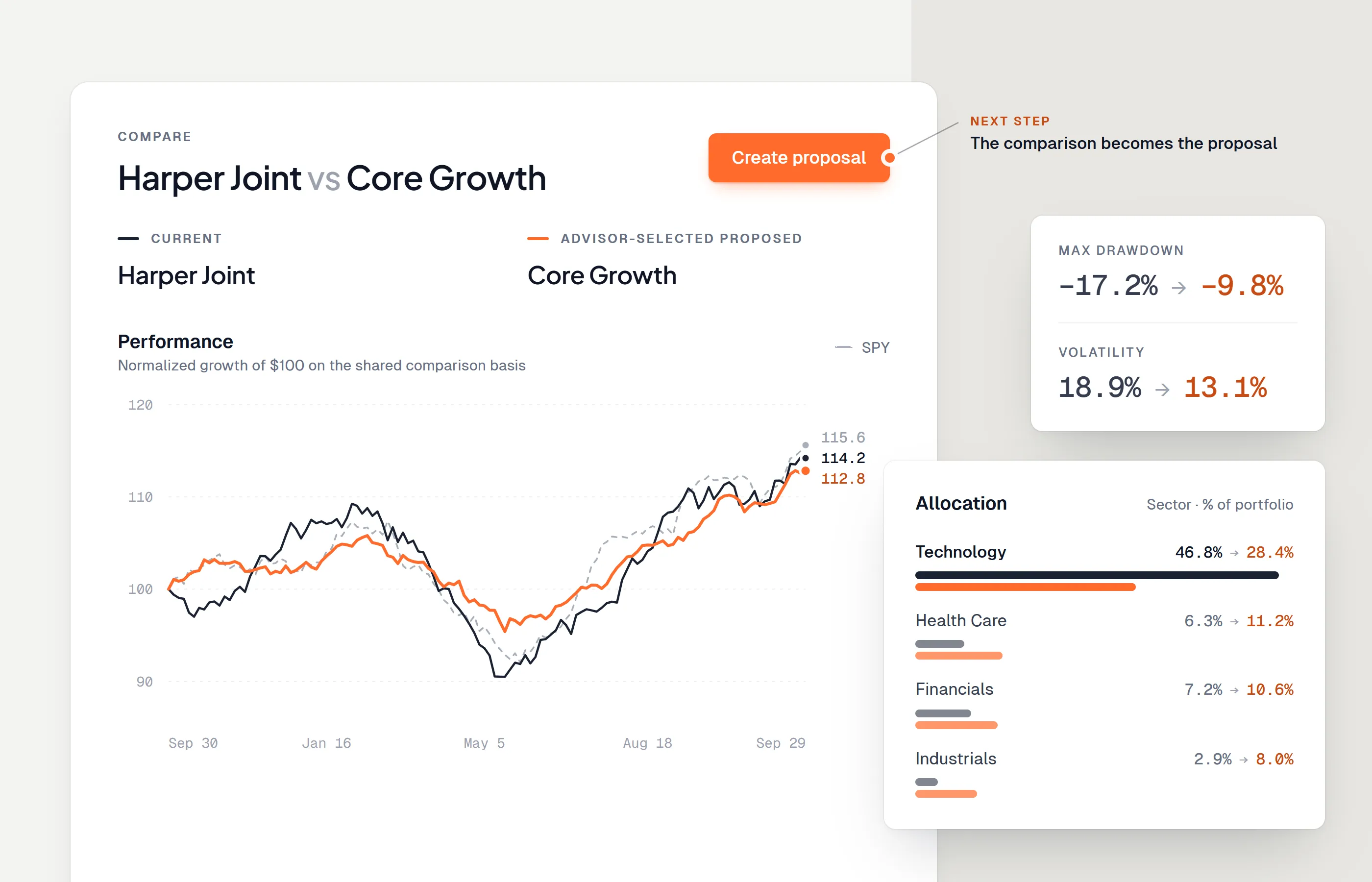
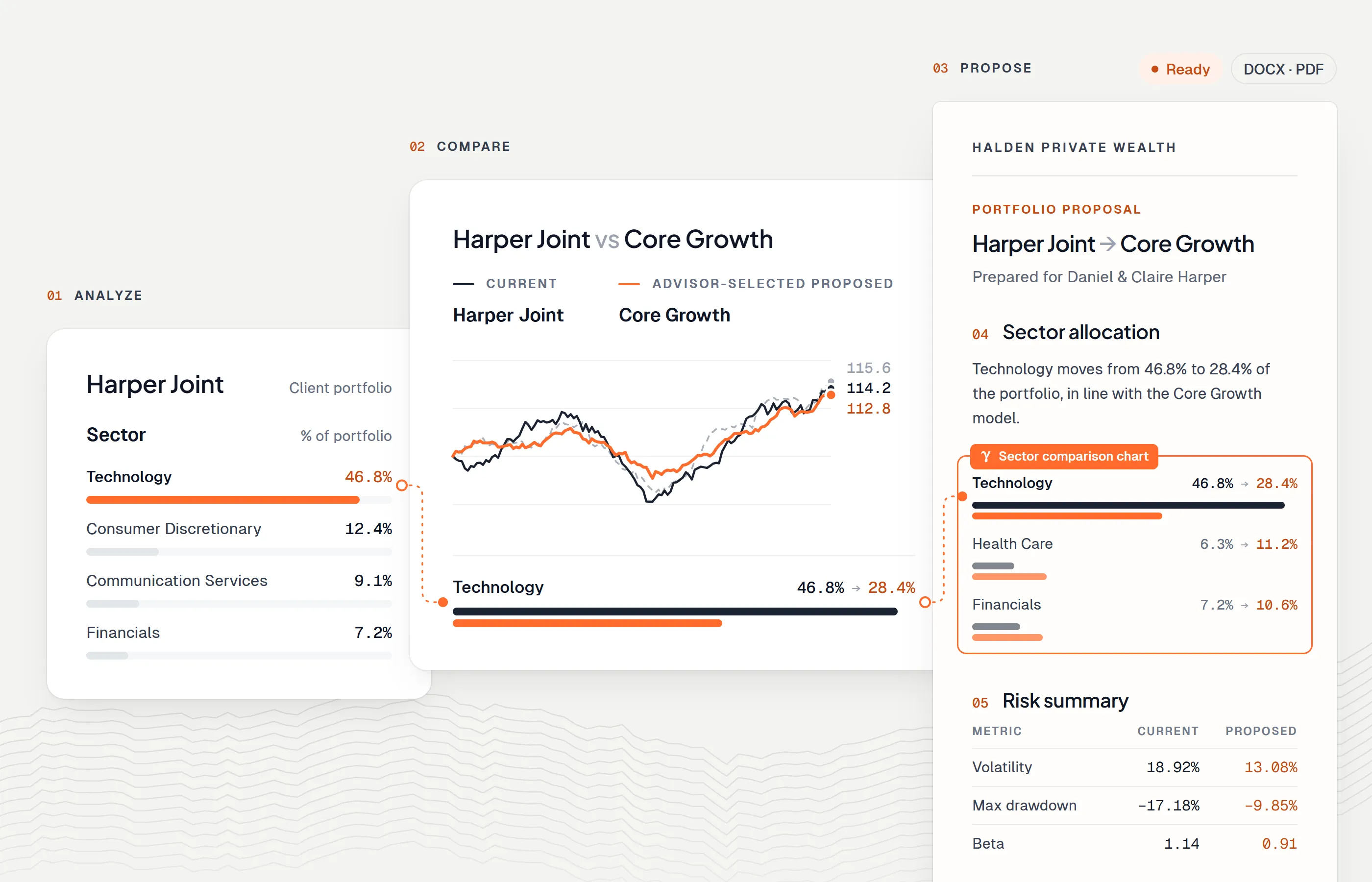
Genesis Risk Monitor is designed around the Analyze → Compare → Propose workflow: analyze the portfolio, compare it with advisor-selected models, and carry the relevant evidence into an editable proposal.
For a deeper review, see Portfolio Risk Analytics for Financial Advisors.
6. Proposal and Document Generation
Portfolio analysis does not automatically become a clear client document.
Proposal software can help advisors combine:
- Executive summary
- Client or prospect context
- Current portfolio
- Risk findings
- Model comparison
- Charts and tables
- Fees
- Methodology
- Disclosures
- Next steps
The advisor should be able to review and edit the final narrative.
A fixed report may be efficient, but it becomes limiting when the advisor needs to change the structure, add approved language, remove irrelevant metrics, or continue editing outside the platform.
Questions to Ask
- Does the proposal begin with connected portfolio data or a blank template?
- Can the narrative be edited?
- Can sections, charts, and tables be changed?
- Are firm-specific disclosures reusable?
- Can the document be exported to DOCX and PDF?
- Can the final file be archived and reviewed?
Genesis Risk Monitor connects portfolio analysis and model comparison with an editable Proposal Builder and Word and PDF export.
See Investment Proposal Template for Financial Advisors for a practical document structure.
7. Compliance, Cybersecurity, Archiving, and Operations
This category is broader than one application.
Advisory firms may need systems and controls for:
- Email and communication archiving
- Document retention
- Identity and access management
- Multi-factor authentication
- Device management
- Security monitoring
- Vendor due diligence
- Policies and attestations
- Advertising review
- Billing and accounting
- Business continuity
- Incident response
The exact obligations depend on the firm, jurisdiction, registrations, services, and technology environment.
Security and compliance should not be treated as features to add after the stack is assembled. Each vendor introduces data, access, and operational dependencies that the firm needs to understand.
Questions to Ask
- What client data does the vendor process?
- Where is data stored?
- Which staff and vendor personnel can access it?
- Does the platform support least-privilege permissions?
- How are authentication, encryption, logging, backup, and incident response handled?
- Can data be exported if the firm changes providers?
- Which records must the firm retain outside the platform?
- What happens if the service is unavailable?
Vendor evaluation is part of technology design, not a separate administrative task.
How to Choose Between All-in-One and Best-of-Breed Tools
An all-in-one platform can reduce integration work and simplify vendor management.
A best-of-breed stack can provide deeper capabilities in the areas most important to the firm.
Neither approach is automatically better.
All-in-One Advantages
- Fewer vendors
- Shared data model
- Simpler training
- Potentially lower integration cost
- More consistent interface
All-in-One Limitations
- Some modules may be shallow
- Switching costs can be high
- Data export may be limited
- The firm may adopt features it does not need
Best-of-Breed Advantages
- Deeper specialized functionality
- More control over each workflow stage
- Easier replacement of one component
- Better fit for differentiated investment or planning processes
Best-of-Breed Limitations
- More integrations
- More vendor reviews
- Greater operational complexity
- Higher risk of duplicate data and disconnected workflows
The correct decision depends on the firm’s priorities and ability to manage the stack.
A Practical Technology Evaluation Framework
1. Define the Workflow Problem
Write the current process before reviewing products.
Example: “A prospect portfolio is imported into one system, analyzed in another, and manually copied into a proposal.”
That problem is more actionable than “we need better software.”
2. Identify the System of Record
Decide where each type of data belongs.
The CRM may be the system of record for the relationship. The planning system may own the plan. A portfolio platform may own analysis and models. The document system may store the approved output.
Ambiguity creates duplicate and conflicting records.
3. Test With Real Work
Use a representative workflow, not a polished vendor example.
Import a real sample portfolio, create a model, run a comparison, prepare a document, export it, and ask another staff member to repeat the process.
4. Review Data Portability
Confirm that the firm can export:
- Client and account data
- Holdings
- Models
- Reports
- Documents
- Audit or activity history, where relevant
A tool is easier to adopt responsibly when the firm understands how it can leave.
5. Evaluate Security and Permissions
Review authentication, user roles, access controls, logging, data handling, and vendor documentation.
Do not assume that a familiar brand or attractive interface answers these questions.
6. Calculate Total Cost
Include:
- Subscription fees
- Implementation
- Data licenses
- Integrations
- Migration
- Training
- Internal administration
- Manual work that remains
- Cost of switching later
The cheapest subscription may produce the most expensive workflow.
7. Measure the Outcome
Define what should improve.
Examples include:
- Time from prospect portfolio receipt to first proposal
- Number of manual data transfers
- Time spent updating recurring documents
- Error rate
- Staff adoption
- Proposal turnaround
- Consistency of portfolio reviews
Technology should be evaluated against the workflow result, not the feature list.
Where Genesis Risk Monitor Fits
Genesis Risk Monitor covers a focused part of the advisor technology stack.
It brings together:
- Market and company research
- Portfolio risk analytics
- Scenario analysis and stress testing
- Advisor-created model portfolios
- Client and prospect portfolio comparison
- Read-only brokerage connectivity
- Editable proposal generation
- DOCX and PDF export
It does not replace a complete CRM, financial planning platform, portfolio accounting system, custodian, or compliance program.
Its role is to reduce the fragmentation between portfolio analysis, model comparison, and proposal preparation.
Explore the Genesis Risk Monitor workflow for financial advisors
Final Thoughts
A financial advisor technology stack should make the firm’s process easier to understand and repeat.
Start with the workflow. Define the system of record. Choose tools that solve clear problems. Test the handoffs between systems. Review security and data portability. Measure the operational result.
The best stack is not the one with the most logos. It is the one that helps the advisor move from client context and portfolio data to a reviewed, defensible, and understandable client conversation.
Disclaimer: This article is for informational purposes only and does not constitute legal, cybersecurity, regulatory, compliance, or financial advice. Firms should conduct their own vendor due diligence and apply requirements appropriate to their jurisdiction, registration, services, and risk profile.
Frequently asked questions
What software does an independent financial advisor need?
A typical independent advisor technology stack includes client relationship management, financial planning, portfolio or custodian data, investment research, portfolio analysis and risk tools, document or proposal generation, and compliance, security, and recordkeeping systems.
Should an RIA use one all-in-one platform?
Not necessarily. An all-in-one system can reduce integration work, while specialized tools may provide deeper functionality. The right choice depends on workflow, data portability, cost, security, and the firm's ability to manage integrations.
How should advisors evaluate new technology?
Start with the workflow problem, verify supported data and integrations, review permissions and security, test export and portability, understand implementation work, and calculate total cost rather than comparing subscription prices alone.
Where does Genesis Risk Monitor fit in an advisor technology stack?
Genesis Risk Monitor connects portfolio and company research, risk analytics, advisor-created model portfolios, portfolio comparison, read-only brokerage connectivity, and editable proposal generation.