Free Portfolio Risk Snapshot
Upload your holdings and we will email you a five-page risk report.
No account needed.
What is the Risk Snapshot?
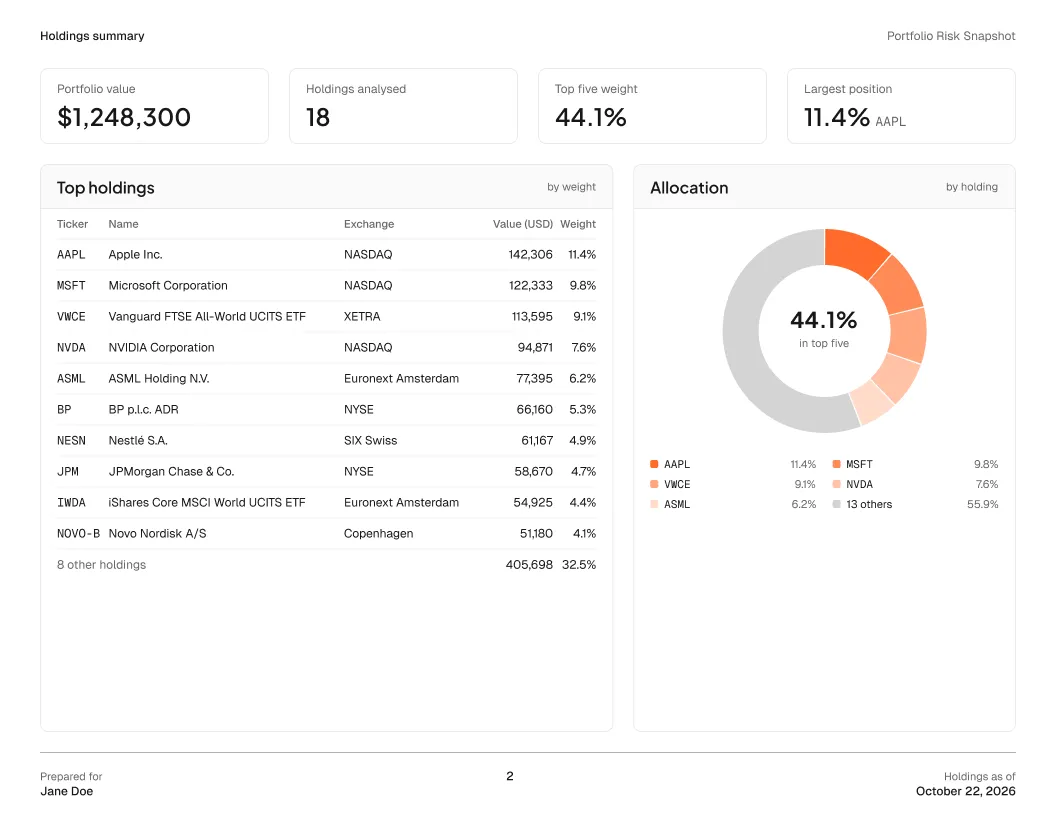
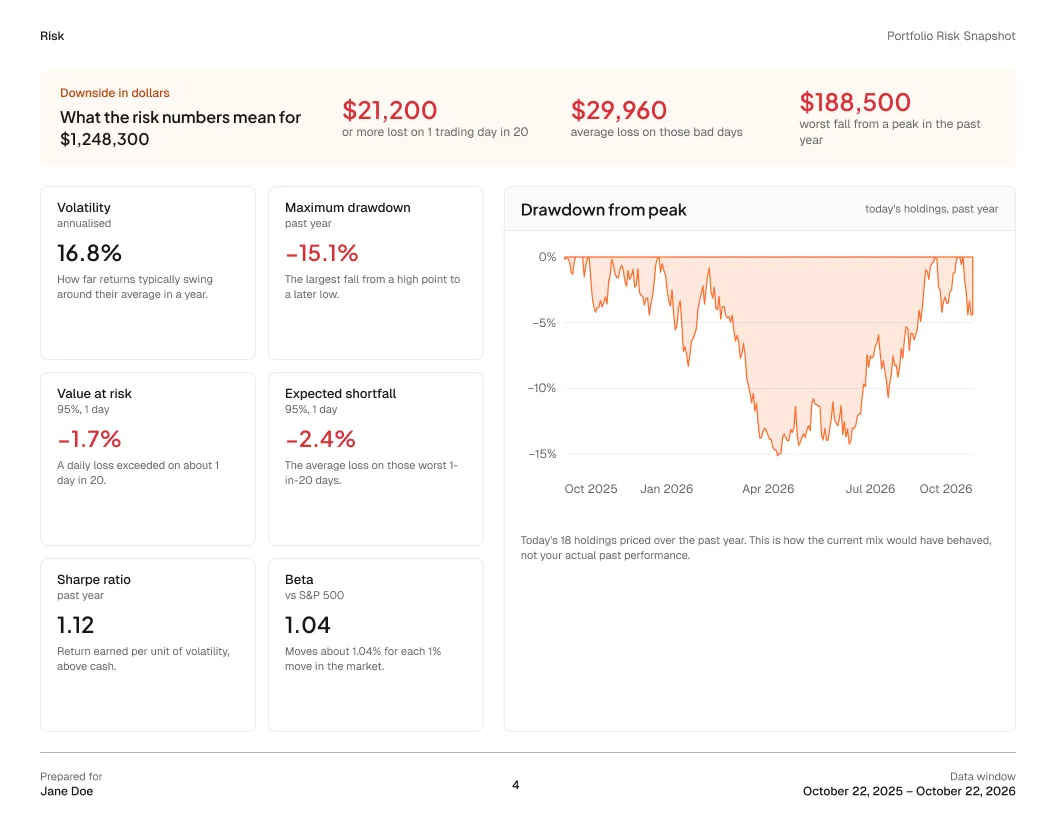
The Risk Snapshot is a free portfolio risk report for financial advisors from Genesis Risk Monitor. Upload a client's or prospect's holdings as a CSV or Excel file of up to 100 rows and we email you a five-page report covering concentration, sector exposure with ETFs looked through, volatility, maximum drawdown, 1-day value at risk, expected shortfall, Sharpe ratio and beta. No account is needed, and the report is not investment advice.
Download a sample Risk Snapshot (PDF) to see the full report before you upload.
To run the same analysis on every client and prospect portfolio, see our portfolio risk analysis software for financial advisors and pricing.
Request your Risk Snapshot
What the report covers
- Holdings summary
- Portfolio value, your largest positions, top-five concentration and allocation by holding.
- Exposure
- Sector exposure with ETFs looked through to what they hold, equity size and style, and instrument mix.
- Risk
- Volatility, maximum drawdown, 1-day value at risk and expected shortfall, Sharpe ratio and beta, in percent and in money.
- Your file
- The email lists every row we left out, with the reason, and every listing we had to assume. Nothing is dropped silently.
Outside the United States, use the ISIN or the listing's suffix, for example SAP.XETRA or BP.LSE. The template lists every supported market. Cash rows are ignored, and shorts are counted as long.
Frequently asked questions
Is the Risk Snapshot free?
Yes. The Risk Snapshot is free and needs no Genesis Risk Monitor account. You upload a file, enter your name and email, and the report arrives by email.
Can I run the Risk Snapshot on a prospect's portfolio?
Yes. Put the prospect's holdings into the template and upload it. The report arrives at your email address, so you can review it before the meeting.
What file does the Risk Snapshot accept?
A CSV or Excel (.xlsx) file with a Symbol and a Quantity column, up to 100 rows. The template linked on this page shows the layout and lists every supported market.
What risk metrics does the report include?
Volatility, maximum drawdown, 1-day value at risk, expected shortfall, Sharpe ratio and beta, in percent and in money, alongside top-five concentration, sector exposure with ETFs looked through, equity size and style, and instrument mix.
Can I include holdings listed outside the United States?
Yes. Use the ISIN, or the symbol with its listing's suffix, for example SAP.XETRA or BP.LSE. Cash rows are ignored, and a short position is counted as a long holding of the same size.
What happens to my holdings file?
The holdings you upload are deleted once the report is sent. Your request (name, email and row counts) is deleted after 90 days. Unless you opt in to marketing emails, your email address is used only to send this report.
Is the Risk Snapshot investment advice?
No. Genesis Risk Monitor does not provide investment advice, recommendations or suitability determinations. The report describes the portfolio you upload.
How is the Risk Snapshot different from Genesis Risk Monitor?
The Risk Snapshot is a one-off emailed report. Genesis Risk Monitor lets advisors analyze client and prospect portfolios, compare them with advisor-created models, and create fully editable client proposals.